OpenAI DevDay 2026: launches and upgrades
OpenAI DevDay 2026 brought a Sol upgrade, browser access for Agents API, Dots, and code security tools. How five announcements work, with examples.
On this page
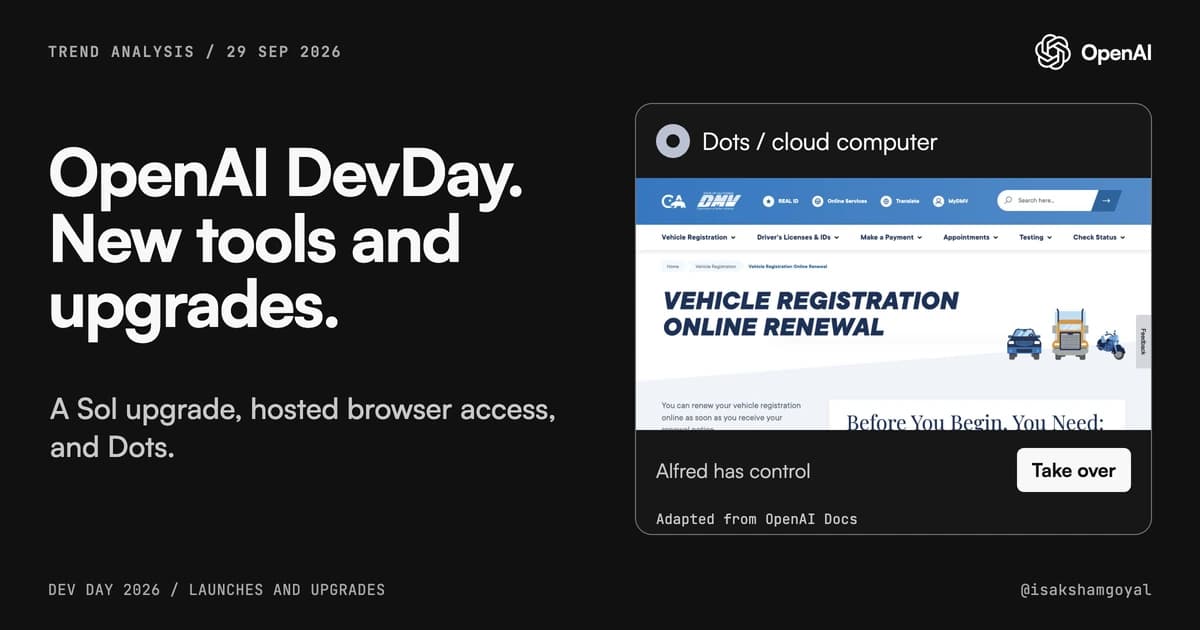
OpenAI held DevDay 2026 on September 29 and announced GPT-6.1 Sol, Dots, Decisions API, and Codex Security Cloud, alongside browser access for the existing Agents API.
GPT-6.1 Sol is an upgrade to OpenAI's model for coding and computer tasks. Dots keep working between conversations. Security Cloud checks GitHub projects for security problems. The Agents API now provides a browser that OpenAI runs for your application.
These five announcements are part of a wider set of DevDay launches and upgrades.
TL;DR DevDay added an OpenAI-hosted browser to the existing Agents API. GPT-6.1 Sol kept GPT-6 Sol's standard input and output prices while lowering cached-input prices. OpenAI describes its performance as close to Astra's. Dots continue assigned work between chats, while Security Cloud scans connected GitHub projects. Decisions API is aimed at choosing from answers a developer defines. It is in limited preview, according to AI Agents Library.
1. GPT-6.1 Sol is an upgrade for coding and computer tasks
GPT-6.1 Sol is an upgrade for coding, using a computer, and working with documents. OpenAI describes its performance as close to GPT-6 Astra on several tests. Try both models on the same task to see how they compare.
Model usage is billed in tokens, the small pieces of text models read or generate. GPT-6 Sol launched on September 22 at $2 per million input tokens and $10 per million output tokens. GPT-6.1 Sol arrived on September 29 with those same standard rates.
Astra charges $10 for input and $50 for output per million tokens. Both Sol versions cost one-fifth as much at these rates. Output charges include the tokens used for the model's reasoning, even when they do not appear in its final answer.
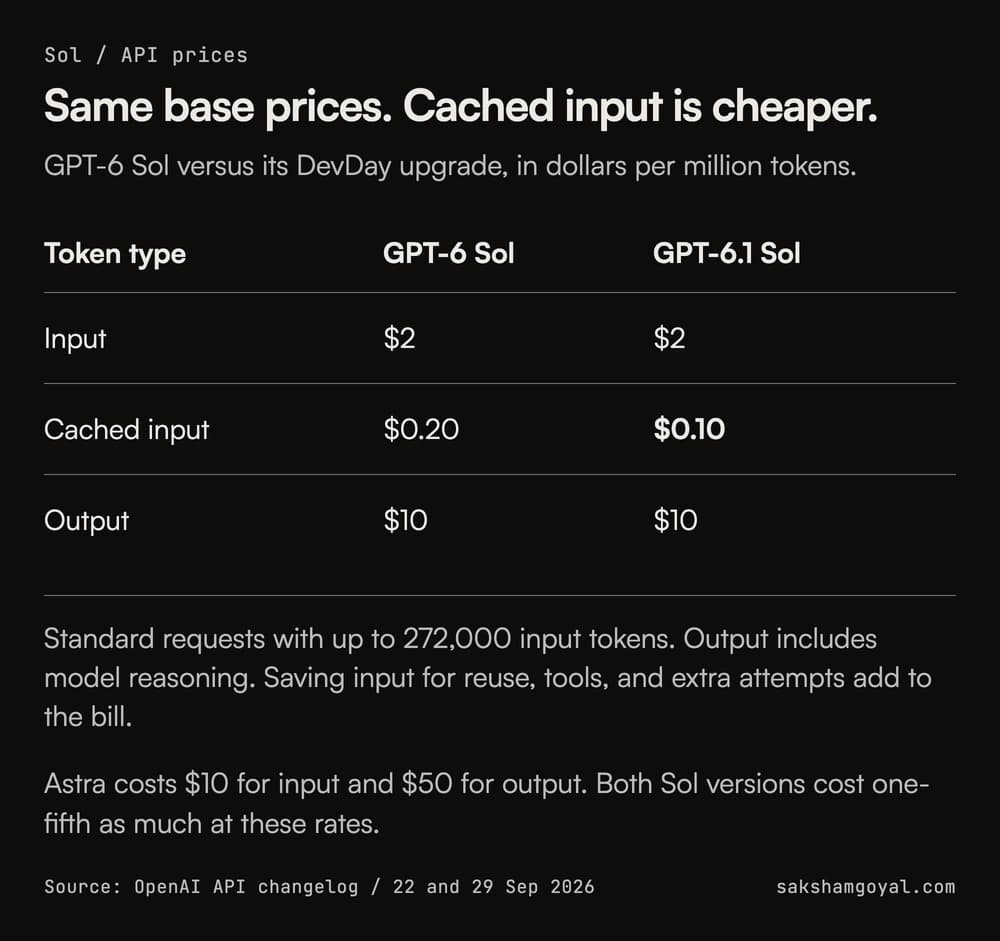
The price change was for cached input, a saved portion of an earlier request that the service can reuse. GPT-6.1 Sol charges $0.10 per million cached input tokens, down from GPT-6 Sol's $0.20. Saving that input has its own charge, so repeated material does not automatically qualify for the lowest rate. The model page lists the full rates.
Its context window, the amount of material it can work with in one request, is 1.05 million tokens. Requests above 272,000 input tokens have higher rates for the whole request.
For example, if you use Astra to investigate a bug and prepare a fix, give Sol the same bug report, code, and tests. Compare whether the fix works, how many attempts it takes, and the full cost. Include failed attempts and corrections in that cost.
Sol is available as gpt-6.1-sol in the API. Check the model guide before switching your app from GPT-6 Sol. Some settings and rules for tool use differ.
2. Agents API gains browser access
The Agents API entered public beta on September 10. It runs an agent through a task. It calls tools, keeps useful information from earlier steps, and saves progress. Your application gives it the task and the tools it may use.
When a task needs to run code or work with files, you can choose a sandbox, an isolated computer where those tools run. OpenAI can provide it, or you can connect a supported computer you manage. Tasks that do not need that computer can run without one.
On September 29, OpenAI added a browser to the Agents API. The browser runs on OpenAI's servers as part of the agent's task. Earlier computer-use tools already let developers build agents that clicked and typed.
The browser guide requires a computer hosted by OpenAI, with desktop access enabled. Your app starts the task, handles requests to visit websites or sign in, and follows the agent's progress.
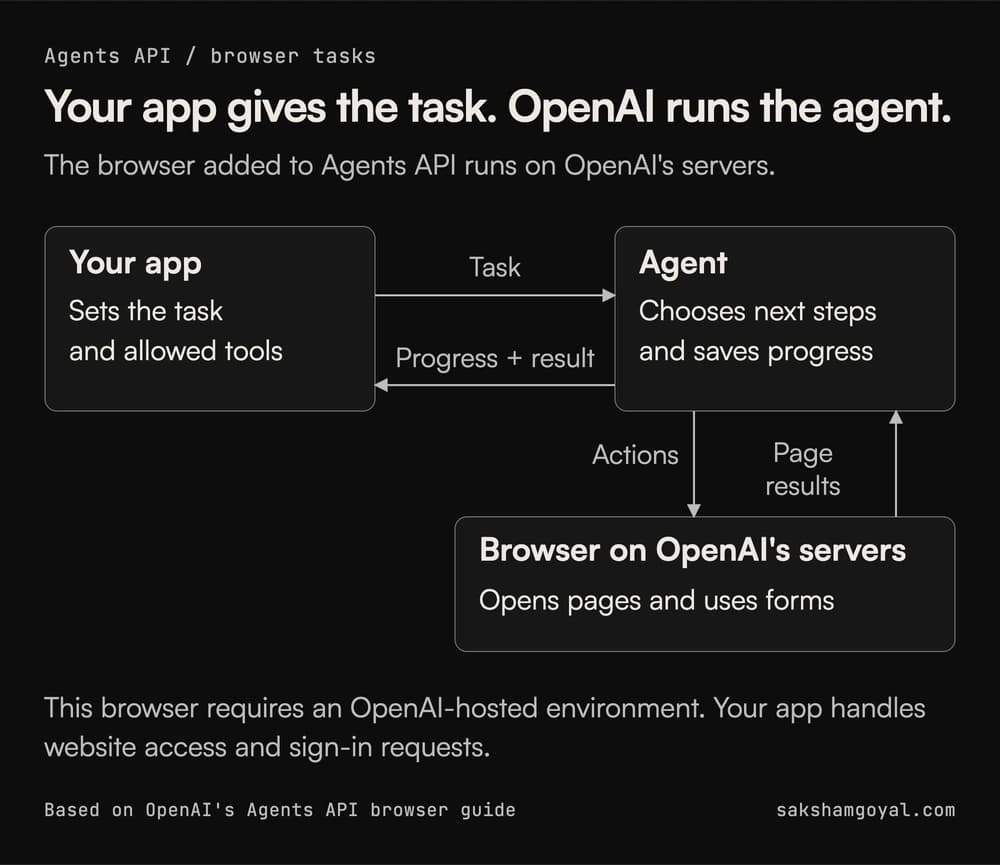
An agent could check a signup form by opening the page, entering test details, and looking for the expected confirmation. An error message or a blocked page means the task is still unfinished. This follows the same tool-using agent pattern: act, inspect what happened, and decide what to do next.
OpenAI's comparison explains who runs that process. With the Agents API, OpenAI runs it and saves progress between tasks. With the Agents SDK, a library for building agents, the process runs inside your application. With the Responses API, your app coordinates the model's answers and tool calls.
You still decide what the agent can access and what counts as a completed task. The bill includes model and tool use, plus computer usage when OpenAI supplies the sandbox.
3. Dots continue work between conversations
Dots are agents powered by GPT-6 Astra that can keep working after you leave the conversation. Each dot has its own computer and browser on OpenAI's servers. It can use relevant notes from earlier conversations when you talk to it in ChatGPT, Slack, or Teams.
For example, you could give a dot an event plan and venue emails, then ask it to track deadlines and draft replies. When a venue changes its price, the dot can bring you the update and ask for a decision. You can open its computer to inspect the browser or take over a step yourself.
There are two kinds of background work. A dot can read information it has access to and keep notes about useful findings. The tools used for that research cannot send messages, edit an app, or control a computer. The dot can still bring you a suggestion based on what it found. For a task you assign, the dot can take actions within your instructions, app permissions, and OpenAI's approval checks.
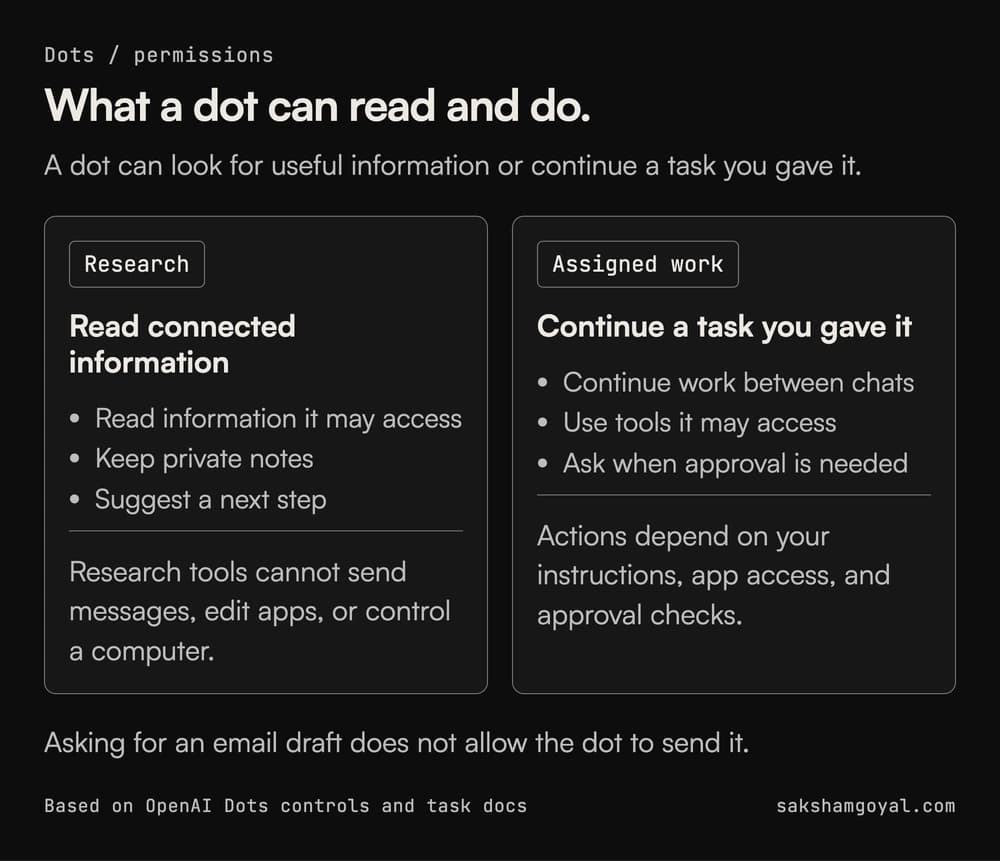
For the venue example, say whether the dot may send a reply or should only prepare a draft. Then open Activity in its profile to review the work.
The current access guide lists a gradual rollout to Pro 100, Pro 200, and Pro 500 users over 18 outside the European Economic Area, UK, and Switzerland. Business Premium is rolling out worldwide. Enterprise access needs a workspace administrator to enable it. An eligible plan does not mean the feature has reached every account yet.
4. Decisions API focuses on choosing an answer
The Decisions API uses GPT-6 Luna to choose from answers a developer defines, based on text or images, according to AI Agents Library. It is in limited preview.
For example, a support app could ask "Which team should handle this?" and define three answers: "billing," "technical," and "needs review." The app could use the answer to send the request.
A message saying "my card was charged twice, and the receipt won't open" contains two problems. Selecting "billing" is an allowed answer, but it could leave the broken receipt unaddressed. The app needs a way to send mixed requests to a person.
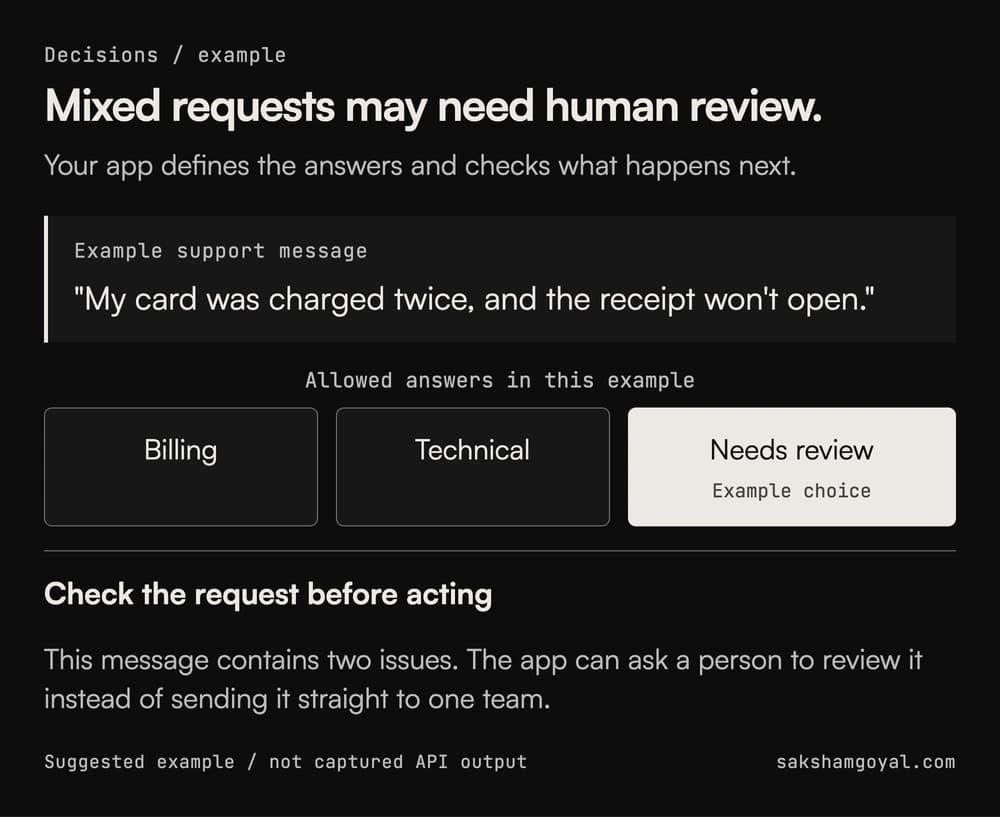
A fixed list gives your app a known set of possible answers. It still needs a way to handle wrong or unclear choices. Before building around this API, check its price, response time, and how it handles unclear requests.
5. Codex Security Cloud looks for security problems in code
Codex Security Cloud is a plugin in research preview that scans code projects connected through GitHub. It is separate from the local Codex Security plugin used in the desktop app and terminal. The Cloud version runs the scans on OpenAI's computers.
It can check a project once or watch for new code changes. It looks at where requests enter the application and which parts may expose data or allow unwanted actions.
OpenAI's FAQ says it tries to demonstrate suspected problems on an isolated computer. It returns the affected code, how serious the issue appears to be, records of its checks, and a suggested fix when available.
Suppose it flags a page that may show one customer's records to another customer. A reviewer needs the affected code and any recorded request or test result that demonstrates the issue. If Codex Security cannot demonstrate the problem, the finding stays unconfirmed. That does not prove the code is safe; the recorded attempt can help someone investigate further.
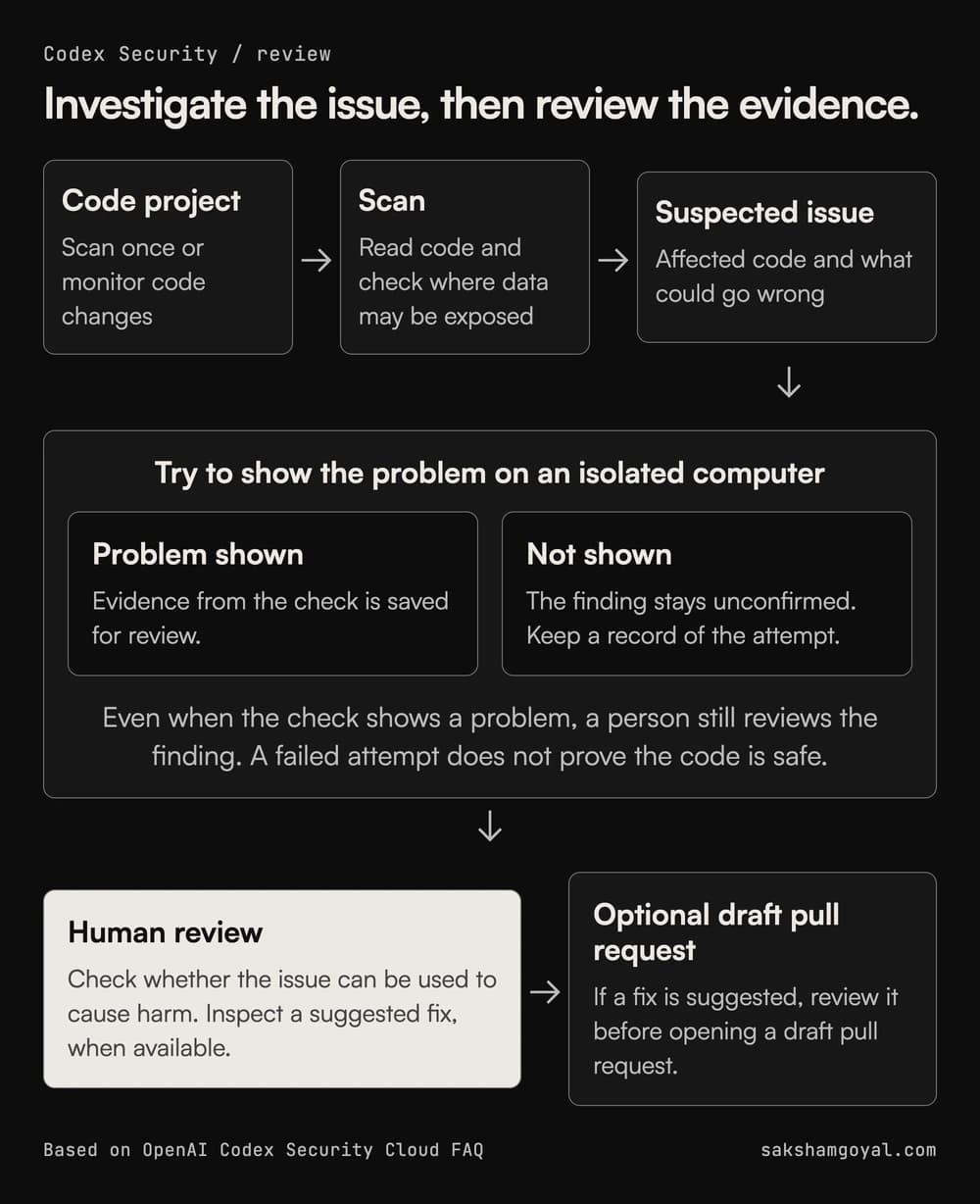
A suggested fix also needs inspection before you create a draft pull request, a proposed code change for the team to review. The scan can help a team decide where to look first, but OpenAI says it complements existing scanners and manual security review.
Where to start
Pick the product that matches work you already do. Compare Sol with your current model on a bug you can test. Try the Agents API on a website task with a clear result. Give a dot one responsibility and say which actions need your approval. If you can access the Decisions preview, try mixed or unclear messages before using its answers to assign requests to a team. For code security, inspect the evidence behind a finding before accepting a fix.
Look for a working code change, a completed form, or a draft that uses the right information. Compare the result and the effort needed to get it.
Sources
- OpenAI Developers: API changelog, including the March 2025 computer-use release and September 2026 updates
- OpenAI Developers: GPT-6.1 Sol model details
- OpenAI Developers: Using GPT-6
- OpenAI Developers: GPT-6 Astra model details
- OpenAI Developers: Agents API computer use
- OpenAI Docs: Meet dots
- OpenAI Developers: Dots tasks and memory
- OpenAI Developers: Control your dot
- OpenAI Docs: Codex Security
- OpenAI Docs: Local Codex Security plugin changelog
- OpenAI Docs: Codex Security Cloud FAQ
- AI Agents Library: DevDay 2026 coverage of Decisions API