How ChatGPT Agent Actually Clicks, Codes and Delivers
OpenAI's ChatGPT Agent combines a planning model, a computer-using agent, and a secure VM to execute multi-step tasks across the web.

OpenAI released ChatGPT Agent, a system that combines a planning model, a computer-using vision agent, and a sandboxed virtual machine to execute multi-step tasks autonomously. It browses websites, writes and runs code, builds presentations, and connects to external services, all inside a temporary VM that gets deleted after each job. This post breaks down the architecture, the tooling, and the benchmark results.
TL;DR ChatGPT Agent pairs an orchestrator model (o4) with a Computer-Using Agent (CUA) trained via reinforcement learning to interact with UIs visually. Everything runs inside a secure, ephemeral VM with a text browser, visual browser, code sandbox, terminal, and service connectors. It sets new state-of-the-art on Humanity's Last Exam (41.6%), BrowseComp (68.9%), and DSBench (89.9% data analysis), while complex tasks still take 5-30 minutes.
 ChatGPT Agent hero image (Source: OpenAI)
How the system works
ChatGPT Agent is a unified agentic system built on two components working in tandem.
The orchestrator reads a plain-language prompt, breaks it into sub-tasks (deep research, web browsing, data analysis, writing), and decides which tool to use at each step. It leverages the reasoning capabilities of o4 for planning, synthesis, and report generation.
The Computer-Using Agent (CUA) is a vision-capable model trained to operate a computer visually. It powers all UI interactions: clicking buttons, navigating websites, filling forms, using desktop applications. This is the same underlying system behind Operator and the OpenAI Testing Agent, now integrated into the broader ChatGPT Agent framework.
The orchestrator decides what needs to happen. The CUA figures out how to do it on screen. Two actors, one shared VM.
Tools inside the VM
All actions run inside a secure, temporary virtual machine hosted on OpenAI's infrastructure. The VM is destroyed after each task completes. The available tools:
- Text browser. Fetches and reads raw HTML. Fast path when no clicks are needed.
- Visual browser. A real browser window controlled by CUA for interactive sites.
- Code sandbox. Python environment for data cleaning, calculations, and chart generation.
- Terminal and apps. Shell access and pre-installed applications like LibreOffice.
- Connectors. Authenticated links to Gmail, Google Calendar, GitHub, and other services.
All tools share the same VM context. The agent can download a file in the browser, process it in the code sandbox, and paste results into a presentation without losing state.
A worked example
Prompt: "Prepare a slide deck explaining the latest tool launch by OpenAI, the ChatGPT Agent."
The agent decomposes the task: research the topic, outline the deck, generate slides, add visuals. It performs deep research using both browsers, synthesizes findings across official blogs and papers, opens presentation software, structures content, generates images, and saves the output. Total runtime: approximately 32 minutes.
Under the hood
The CUA operates on a screenshot-to-action loop. Each time a page loads, it receives an image of the screen, reasons for a few seconds, then dispatches an action (click(x,y), type("search term"), scroll). A new screenshot arrives, and the loop repeats.
The model was trained on millions of examples of humans interacting with UIs, then fine-tuned with reinforcement learning to complete tasks in fewer steps. All tools (browser, Python, desktop apps) share a single VM, so the agent can move data between them without context switches.
Safety intercepts pause execution for consequential actions (purchases, emails, account changes) and require explicit confirmation before proceeding.
Benchmark results
OpenAI reports state-of-the-art results on several benchmarks:
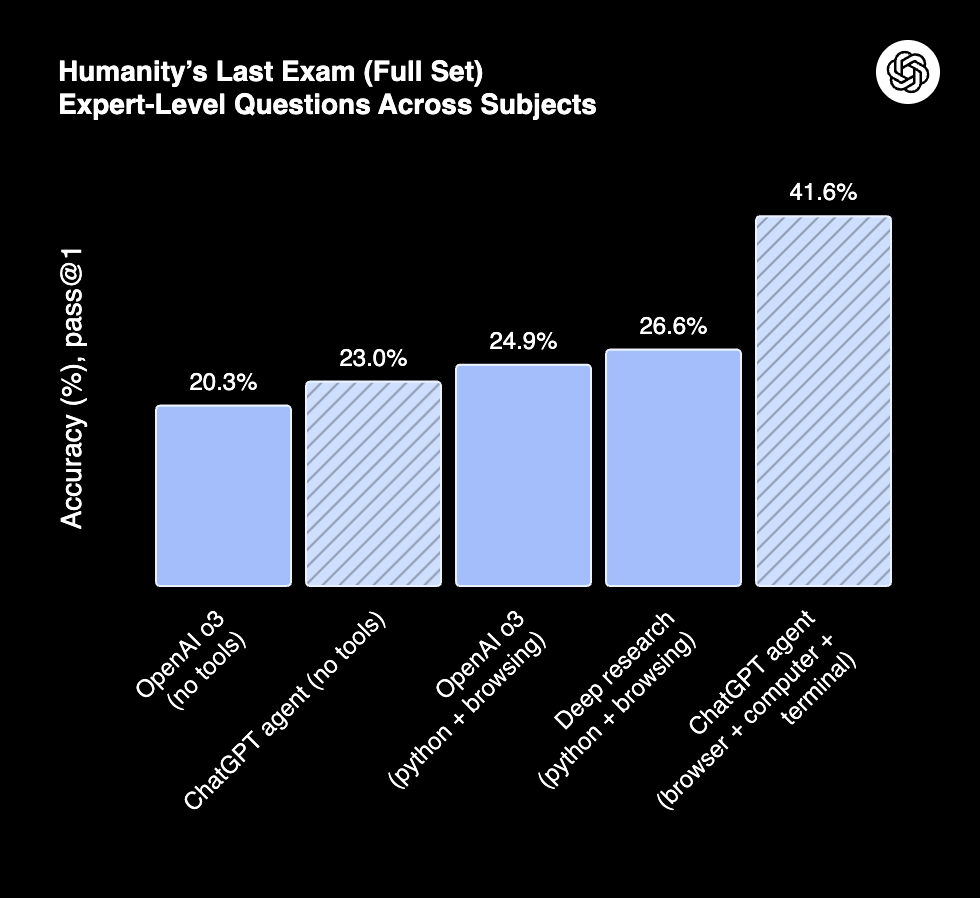 Humanity's Last Exam (Source: OpenAI)
- Humanity's Last Exam: 41.6% (pass@1), up from o3 at 20.3% and Deep Research at 26.6%.
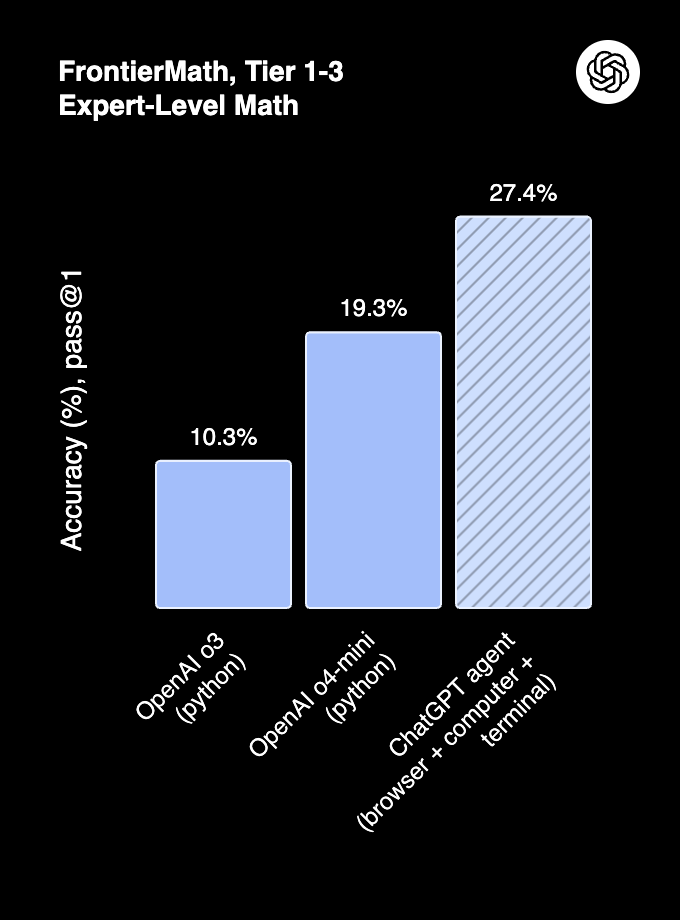 FrontierMath Accuracy (Source: OpenAI)
- FrontierMath: 27.4% accuracy with tool use, outperforming o3 (10.3%) and o4-mini (19.3%).
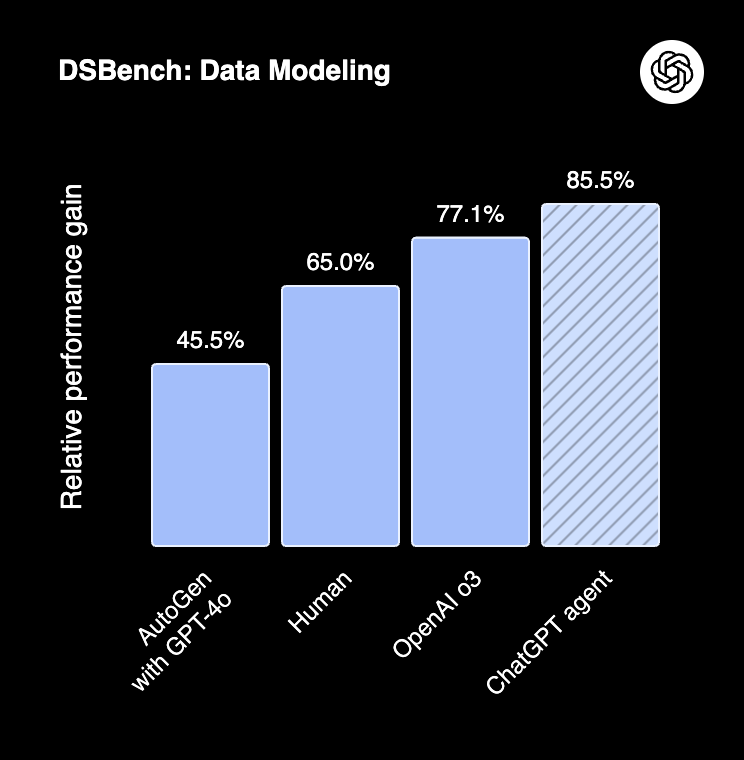 DSBench Performance (Source: OpenAI)
- DSBench: 89.9% in data analysis and 85.5% in data modeling, surpassing human performance.
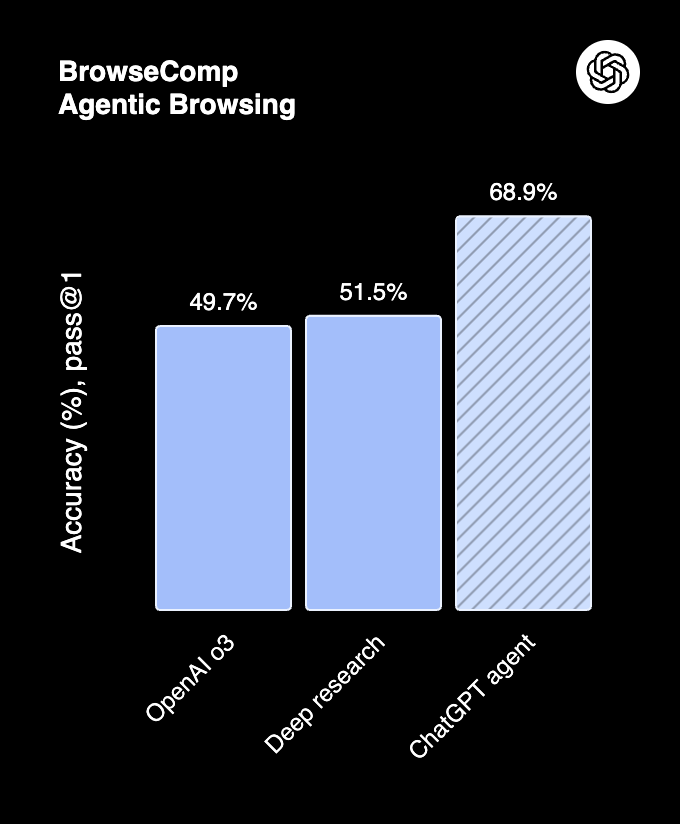 BrowseComp (Source: OpenAI)
- BrowseComp: 68.9%, surpassing Deep Research (51.5%) and o3 (49.7%).
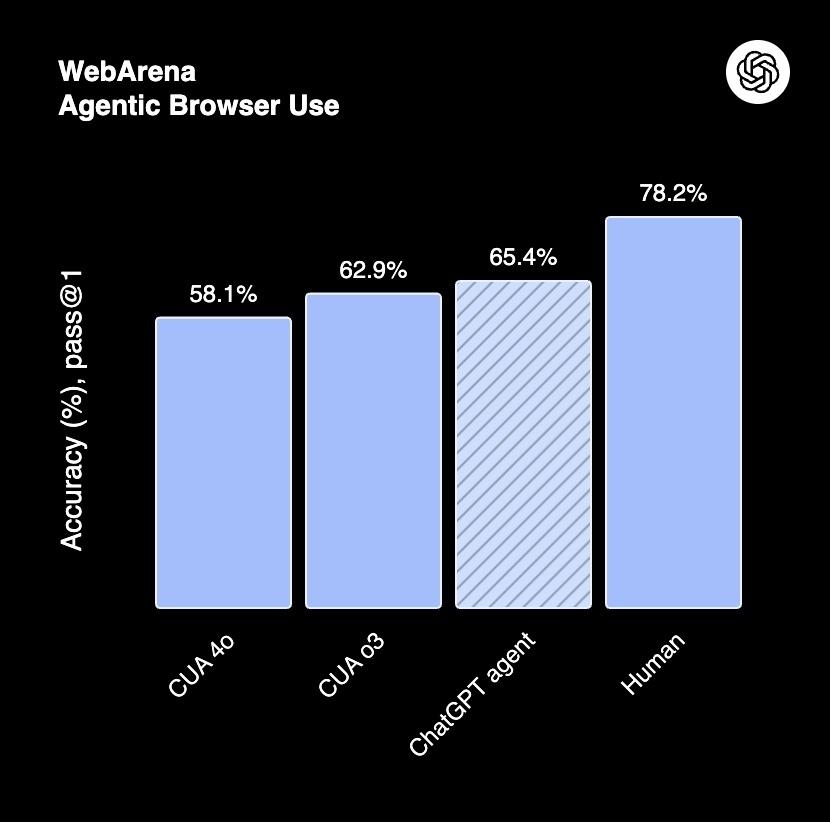 WebArena (Source: OpenAI)
- WebArena: 65.4%. Human performance remains at 78.2%.
Current limitations
- Latency. Complex tasks take 5-30 minutes, sometimes up to an hour.
- UI reliability. The CUA can miss buttons or struggle with complex layouts and CAPTCHAs.
- Safety friction. Approval prompts can interrupt valid task flows.
- Tool coverage. Only certain apps are pre-installed. Not all workflows are supported.
- Availability. Pro users get 400 messages/month; other paid tiers get 40.
Safety architecture
OpenAI implemented multi-layered safeguards:
- Prompt injection mitigation. The agent is trained to resist adversarial manipulation embedded in web pages.
- Sandbox isolation. Internet is blocked inside the Python sandbox. The VM is deleted after each job.
- User confirmation. Risky actions (purchases, emails) are paused for approval.
- Watch mode. Critical tasks require active oversight.
- Privacy controls. One-click deletion of all browsing data and session logouts.
Why it matters
ChatGPT Agent is not a chatbot with extra features. It is a system that can operate real software, navigate the live web, execute code, and produce deliverables inside a full virtual desktop.
The benchmark results show strong capability gains, particularly on tasks that combine reasoning with tool use. The architecture, a planning model paired with a vision-trained CUA inside a sandboxed VM, represents a shift from conversational AI toward autonomous task execution.
The gap between agent capability and reliability (CUA still misses buttons, complex workflows still fail) is the primary constraint. The foundation is functional. The question is how fast the reliability curve catches up.
Sources
- OpenAI: Introducing ChatGPT Agent
- OpenAI: Introducing Operator
- OpenAI Testing Agent demo: GitHub