Cloudflare Built a Browser for AI Agents
Kitesurf runs entirely in V8 isolates on Cloudflare Workers. It uses 3x less CPU and 7x less memory than Chromium, and is a full rewrite in Rust rather than a Chromium wrapper.

On this page
On August 6, 2026, Cloudflare launched Kitesurf, an agent-first browser that runs entirely inside V8 isolates on Workers. It uses 3.1x to 3.8x less CPU and 4.7x to 7x less memory than headless Chromium, passes 215,000+ Web Platform Tests, and is a full rewrite in Rust rather than a Chromium wrapper. This post covers the architecture, how it compares to Chromium, and the trade-off Cloudflare made to get there.
TL;DR Kitesurf is three stateless components (Engine, PageScript, PageRenderer) written in Rust and compiled to WebAssembly, running in Workers isolates. Rendering is powered by Blitz on Servo components, Firefox's Stylo handles CSS, and Boa JS handles the occasional eval since Workers does not expose native eval. On Cloudflare's 14-URL benchmark it uses 3.1x less CPU and 4.7x less memory than warm Chromium for screenshots, and 3.8x less CPU and 7x less memory for HTML extraction, at 1.7 to 1.8x slower wall-clock. It exposes the Chrome DevTools Protocol, so Playwright, Puppeteer, and MCP clients drive it unchanged.
The problem it solves
Headless Chromium was built by taking a browser designed for humans and stripping the visible parts off. It still carries the machinery for tabs, extensions, sync, pixel-perfect scrolling, and every codec and API a modern browser needs. Agents pay for all of it in CPU cycles and memory, on tasks that never render to a screen and never need to hit 60 fps.
Cloudflare argues the workload has shifted enough to justify a different tool. In its Q2 2026 earnings, Cloudflare reported that non-human traffic crossed 50% of its network for the first time, with daily AI agent requests up more than 1,700% year over year. What agents actually need from a browser is a short list: structured content extraction, screenshots for vision models, session isolation, and low resource cost. Everything else is overhead.
Kitesurf drops the everything-else.
How the system works
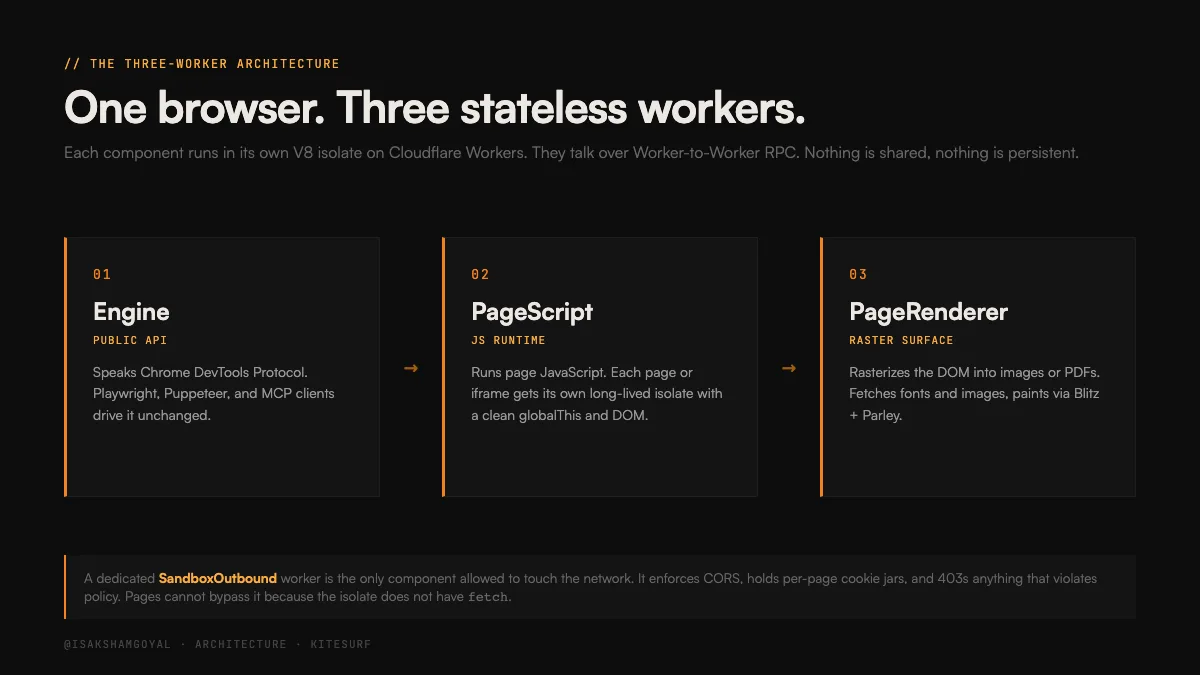
Three stateless components, each a Worker, communicating over Worker-to-Worker RPC:
- Engine. The public API surface. Speaks Chrome DevTools Protocol so existing clients (Playwright, Puppeteer, chrome-remote-interface, MCP) work without changes.
- PageScript. Runs the page's JavaScript. Each page or out-of-process iframe gets its own long-lived isolate with a clean
globalThisand DOM. - PageRenderer. Rasterizes the DOM into images or PDFs. Fetches fonts and images, paints the scene using Blitz Paint and Parley, returns the buffer to the Engine over RPC.
Because every component is stateless and lives in a Workers isolate, sessions are cheap to spawn, cheap to isolate, and cheap to tear down. That is the primitive Chromium-in-a-container was never designed to compete with.
The rendering pipeline
The rendering path is a chain of Rust libraries compiled to WebAssembly:
- HTML parsing, layout, and paint run through Blitz, a modular rendering engine built on Servo components.
- CSS parsing uses Stylo, the same CSS engine Firefox ships in production.
- JavaScript runs on V8 natively, since Workers already runs V8. The one gap is
eval(), which Workers does not expose. When a page calls eval, Kitesurf falls back to Boa, a Rust ECMAScript engine. A runtime running on top of a runtime for one specific case.
Rasterization goes through Blitz Paint and Parley for text layout, all in Rust, all in Wasm, all inside the isolate.
Network isolation
The only component allowed to make outbound network requests is a dedicated SandboxOutbound worker. It enforces CORS, injects browser-shaped request headers so servers cannot trivially fingerprint the client, holds per-page cookie jars, and returns 403 for anything that violates policy. Pages cannot bypass it because the isolate does not have access to fetch at all. The network boundary is architectural, not policy.
Kitesurf vs Chromium
Different priorities, different trade-offs. The comparison is not "Kitesurf is faster than Chromium." It is "Kitesurf is cheaper per session than Chromium, at the cost of wall-clock speed."
- Startup. Chromium spins up a browser process in a container, seconds. Kitesurf spins up a Workers isolate, milliseconds.
- Session isolation. Chromium isolates via processes and containers. Kitesurf isolates via V8 isolates, orders of magnitude lighter.
- Rendering. Chromium uses Blink and V8 with a JIT-optimized rendering path. Kitesurf uses Blitz and Stylo compiled to Wasm, with no JIT for the render pipeline.
- JavaScript. Both run V8. Kitesurf loses on
eval()since it has to route through Boa. - Compatibility surface. Chromium supports every web platform feature. Kitesurf passes 215,000+ Web Platform Tests at launch and adds hundreds more each week, but skips video, WebGL, and TLS fingerprint negotiation.
- Client protocol. Both speak CDP. Existing tooling works unchanged.
- Deployment. Chromium requires containers and a lot of RAM. Kitesurf runs anywhere Workers runs, which is Cloudflare's entire edge network.
Benchmark results
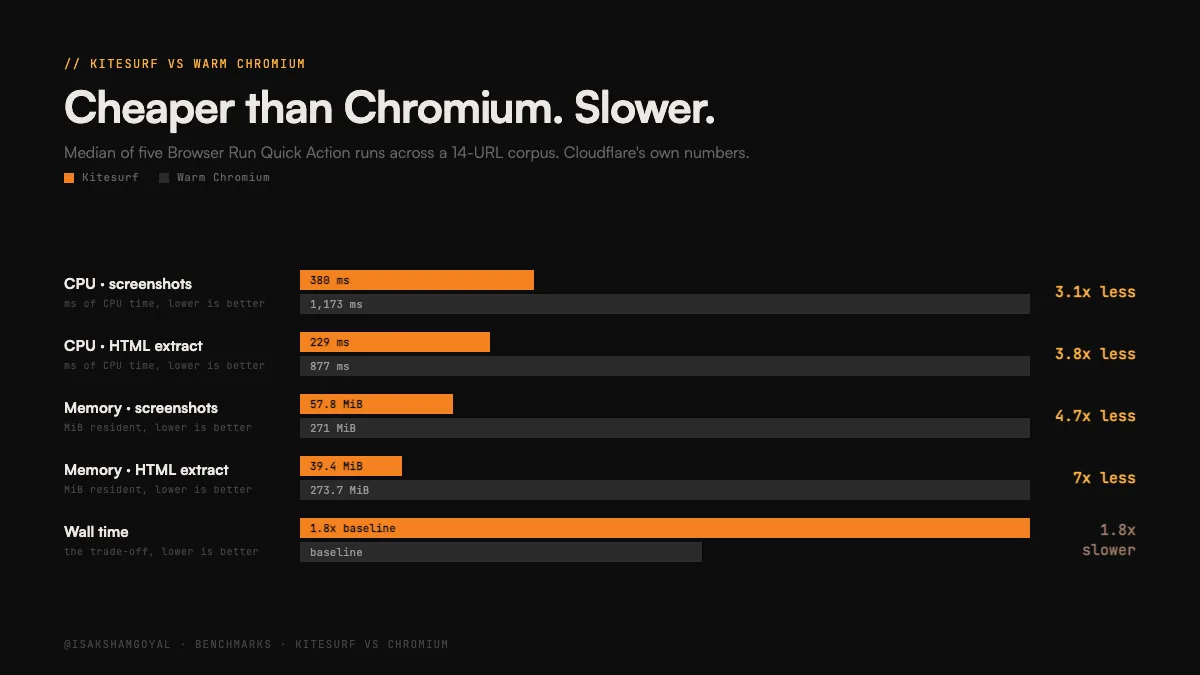
Cloudflare reports medians from five Browser Run Quick Action runs across a 14-URL corpus.
Screenshots:
- CPU: 380 ms (Kitesurf) vs 1,173 ms (warm Chromium). 3.1x less.
- Memory: 57.8 MiB vs 271 MiB. 4.7x less.
- Wall time: 1.8x slower.
HTML extraction:
- CPU: 229 ms vs 877 ms. 3.8x less.
- Memory: 39.4 MiB vs 273.7 MiB. 7x less.
- Wall time: 1.7x slower.
The trade is legible. Kitesurf wins on the CPU and memory that drive your bill. Chromium wins wall time because a warm JIT beats a cold Wasm rendering path. For agent fleets billed by resource usage, the arithmetic is straightforward. For real-time interactive sessions where latency matters more than cost, it is not.
When to use Chromium instead
Kitesurf is not a Chromium replacement for every use case, and Cloudflare says so directly. Use Chromium when:
- You need to play video or render WebGL.
- You need to negotiate a bot-challenge handshake with real TLS fingerprints.
- You need a long-running authenticated session with persistent state.
The last one is worth reading twice. Kitesurf isolates are stateless. A workflow that logs into a site, holds a session cookie, and clicks through 40 pages over 20 minutes is exactly the workflow Kitesurf is not built for. Screenshot a page, extract structured data, discard the isolate is the pattern.
Why it matters
Two things stand out.
First, the origin story. The project went from first commit to public beta in 12 weeks. Cloudflare says the team used AI agents heavily during development, with Web Platform Tests as the goalpost, because WPT gives a binary pass/fail signal that agents can iterate against without human review. The team focused on architecture, agents picked off feature conformance. This is the same pattern AlphaEvolve used to break the matrix multiplication record: an evaluation surface that scores automatically is what lets an agent loop compound. Kitesurf is that pattern applied to shipping infrastructure.
Second, the architecture is what happens when you rebuild the browser for a workload it was never designed for. Chromium is a general tool that agents happen to use. Kitesurf is a specialist. Both will exist for a while, but the specialist gets meaningfully cheaper per session, and by Cloudflare's own reporting agent workloads have already pushed non-human traffic past 50% on its network. The right question is not whether Kitesurf beats Chromium on wall time. It is which one is running your agent fleet in eighteen months.